Media

Image Format Converter

Convert images between PNG, JPG, WebP, GIF, and SVG.

Image Format Converter
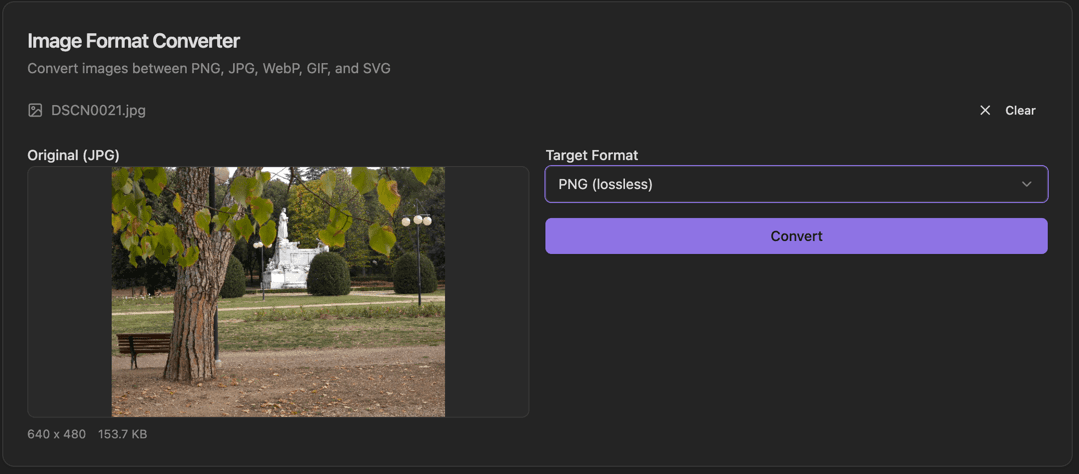
Image Format Converter interface showing filename display with clear button and original image preview

Features

Filename display with Clear button
Original image preview
Format label (JPG, PNG, etc.)
Dimensions and file size display
Target Format dropdown (PNG lossless, JPG, WebP, GIF, SVG)
Convert button
Image preview before conversion
Quality options for lossy formats

About Image Format Converter

The Image Format Converter handles all common image format conversions. Drop an image to see a preview with the original format, dimensions, and file size. Select a target format and convert with a single click.

How It Works

  1. 1

    Drop an image or select from your files

  2. 2

    View the original with format, dimensions, and size

  3. 3

    Select the Target Format from the dropdown

  4. 4

    Click Convert to transform the image

  5. 5

    Click Clear to start over with a new image

Use Cases

Converting WebP to PNG/JPG for compatibility
Creating ICO files for favicons
Optimizing images for web (WebP conversion)
Converting screenshots to different formats
Batch processing image libraries
Creating web-optimized versions of images

Frequently Asked Questions

Which format is best for web images?
WebP offers the best compression for photos while maintaining quality. For images requiring transparency, PNG or WebP are good choices. JPEG works well for photos where small file size is priority.
Can I convert to ICO for favicons?
Yes, the tool creates properly formatted ICO files. You can include multiple sizes in one ICO file for different display contexts.
Is quality lost when converting?
Converting between lossy formats (like JPEG) can reduce quality. Converting from lossless (PNG) to lossy (JPEG) is fine but not reversible. The quality slider lets you balance file size and quality.

Ready to Use Image Format Converter?

Download PrimeUtils and get access to Image Format Converter plus 20+ other developer tools.