Text / Code

ASCII / HEX Converter

Convert text to hexadecimal and vice versa.

ASCII / HEX Converter
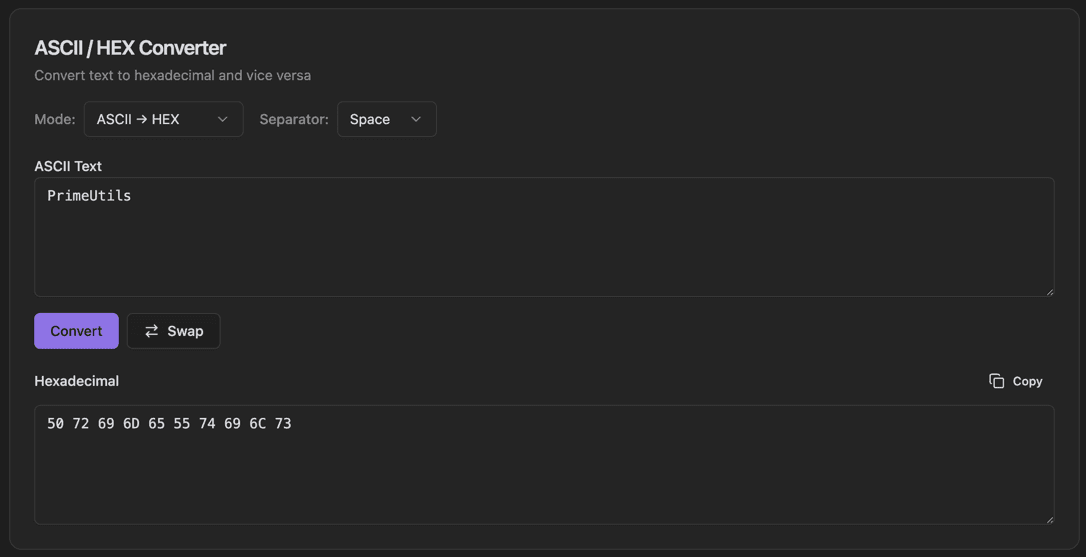
ASCII / HEX Converter interface showing mode selector (ascii → hex or hex → ascii) and separator dropdown (space, colon, none)

Features

Mode selector (ASCII → HEX or HEX → ASCII)
Separator dropdown (Space, Colon, None)
ASCII Text input field
Convert button
Swap button to reverse direction
Hexadecimal output display
Copy output to clipboard
Real-time conversion

About ASCII / HEX Converter

The ASCII/HEX Converter transforms text to its hexadecimal representation and back. Choose the conversion direction with the Mode dropdown, select your preferred separator format, and convert instantly. Perfect for debugging, analyzing data, or understanding byte-level encoding.

How It Works

  1. 1

    Select the Mode (ASCII → HEX or HEX → ASCII)

  2. 2

    Choose a Separator format (Space, Colon, or None)

  3. 3

    Enter text in the ASCII Text field

  4. 4

    Click Convert to see the hexadecimal result

  5. 5

    Use Swap to quickly reverse the conversion direction

Use Cases

Debugging network protocols
Analyzing binary file headers
Working with serial communication
Understanding character encoding
Reverse engineering data formats
Creating hex dumps for documentation

Frequently Asked Questions

What separator formats are supported?
You can choose between spaces (48 65 6C 6C 6F), colons (48:65:6C:6C:6F), or no separator (48656C6C6F). The tool auto-detects the separator when decoding.
Does it support Unicode characters?
Yes, the tool converts Unicode characters to their UTF-8 byte representation in hexadecimal. Multi-byte characters will show as multiple hex values.
Can I convert binary to hex?
Yes, you can enter binary (base-2) values and convert them to hexadecimal or ASCII. Use the binary mode toggle to switch input formats.

Ready to Use ASCII / HEX Converter?

Download PrimeUtils and get access to ASCII / HEX Converter plus 20+ other developer tools.