Text / Code

AsciiDoc Editor

Edit and preview AsciiDoc with live rendering.

AsciiDoc Editor
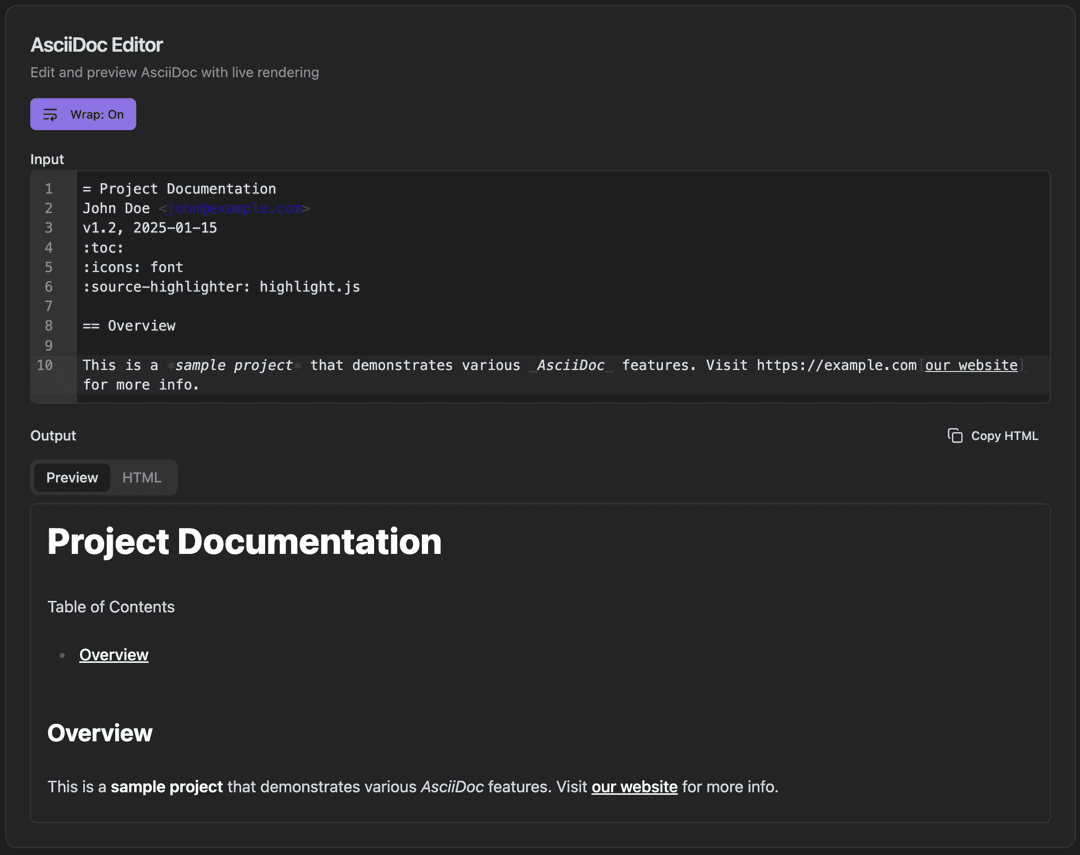
AsciiDoc Editor interface showing input pane with line numbers and wrap toggle button

Features

Input pane with line numbers
Wrap toggle button
Live preview rendering
Output with Preview/HTML tabs
Copy HTML button
Table of contents generation
Full AsciiDoc syntax support
Syntax highlighting

About AsciiDoc Editor

AsciiDoc is a powerful documentation format favored for technical writing. This editor provides real-time rendering of AsciiDoc syntax with Preview and HTML output tabs. Includes table of contents generation and syntax highlighting.

How It Works

  1. 1

    Type AsciiDoc syntax in the Input pane

  2. 2

    Toggle Wrap to control line wrapping

  3. 3

    View the rendered output in the Output pane

  4. 4

    Switch between Preview and HTML tabs

  5. 5

    Copy the HTML output with the Copy HTML button

Use Cases

Writing technical manuals
Creating API documentation
Book and e-book authoring
Software documentation
Knowledge base articles
Technical specifications

Frequently Asked Questions

How is AsciiDoc different from Markdown?
AsciiDoc is more powerful and feature-rich than Markdown. It supports complex tables, admonitions, cross-references, includes, and many features needed for professional documentation.
Can I export to PDF?
Yes, you can export your AsciiDoc content to HTML. For PDF generation, the exported HTML can be processed through AsciiDoctor PDF or similar tools.
Does it support include directives?
The preview supports include syntax, though actual file includes require running in a context with file system access. The desktop app supports local includes.

Ready to Use AsciiDoc Editor?

Download PrimeUtils and get access to AsciiDoc Editor plus 20+ other developer tools.