Text / Code

URL Encoder/Decoder

Encode and decode text for use in URLs (query parameters, etc.).
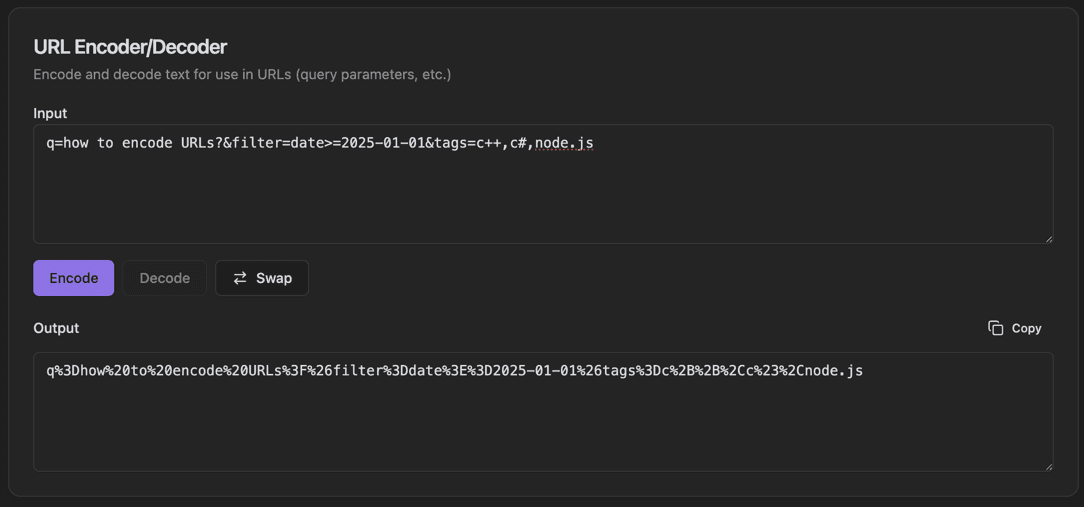
URL Encoder/Decoder
URL Encoder/Decoder interface showing input text field and encode/decode toggle buttons

Features

Input text field
Encode/Decode toggle buttons
Swap button to reverse input/output
Output field with Copy button
Real-time conversion
Handles query parameters
Special character escaping
Clean minimal interface

About URL Encoder/Decoder

URL encoding (percent-encoding) is essential for safely transmitting data in URLs. This tool encodes special characters like spaces, ampersands, and question marks into their percent-encoded equivalents. Decode URLs back to readable text with a single click.

How It Works

  1. 1

    Enter text in the Input field

  2. 2

    Click Encode to convert special characters to percent-encoded format

  3. 3

    Click Decode to convert percent-encoded text back to readable text

  4. 4

    Use Swap to exchange input and output

  5. 5

    Copy the result with the Copy button

Use Cases

Encoding parameters for API requests
Debugging URL-related issues
Creating bookmarklets
Handling special characters in form data
Building dynamic URLs
Decoding tracking parameters

Frequently Asked Questions

What characters need to be URL encoded?
Reserved characters like ?, &, =, /, #, and spaces must be encoded when used as data in URLs. The tool handles all reserved and unsafe characters according to RFC 3986.
What's the difference between full and component encoding?
Full encoding encodes the entire string. Component encoding (encodeURIComponent) is for encoding values in query parameters, preserving URL structure characters when needed.
Why are spaces sometimes + and sometimes %20?
In query strings (application/x-www-form-urlencoded), spaces can be represented as +. In other parts of URLs, %20 is used. The tool supports both conventions.

Ready to Use URL Encoder/Decoder?

Download PrimeUtils and get access to URL Encoder/Decoder plus 20+ other developer tools.